

Description
Download Timer Loop – Chrome Apps, timer, timer loop, productivity tool
Overview
Timer Loop is a straightforward desktop application designed to help users manage time through customizable sequences of timers. It enables the creation and playback of multiple timers in a repeating loop, making it ideal for structured routines such as work or study sessions, interval training, and turn-based games. The software operates entirely offline, ensuring uninterrupted use without requiring an internet connection. Its core purpose is to enhance focus and time management by automating repetitive timing tasks, reducing the need for manual tracking.
Target users include students, professionals, fitness enthusiasts, and game organizers who rely on structured timing. The application supports flexible scheduling, allowing users to define individual durations and order for each timer within a sequence. For example, a student might set a loop of “45 minutes work,” “10 minutes break,” and “5 minutes email,” which repeats until manually stopped. Similarly, athletes can use it for sprint-rest intervals, while game hosts can assign turn times to players.
Developed by AppsByH, the software has been available since its initial release in November 2012. Over the years, it has evolved with incremental updates focused on usability, stability, and feature expansion. The developer has maintained a consistent release cycle, adding support for more timers, keyboard shortcuts, and improved UI elements. The application is part of a broader suite of productivity tools, including a Chrome web store extension and an Android version.
Key Features & Capabilities
- Multi-Timer Sequencing – Users can create and manage multiple timers within a single loop, defining custom durations and order. This enables complex time management workflows such as Pomodoro-style work cycles or athletic interval training.
- Loop Playback – Once the sequence completes, the application automatically restarts from the beginning, creating a continuous loop. This feature is especially useful for long study sessions or endurance training routines.
- Drag-and-Drop Reordering – Timers can be rearranged in real time using intuitive drag-and-drop functionality, allowing users to adjust their schedule without re-entering data.
- Individual Alarm Control – Each timer can have its alarm enabled or disabled independently, offering flexibility for silent breaks or non-urgent alerts.
- Keyboard Shortcuts – The software supports a full set of keyboard commands: SPACE to play/pause, RETURN/ENTER to reset, RIGHT and LEFT arrows to navigate between timers, enhancing efficiency for power users.
- Reset and Pause Functionality – Users can pause, rewind, skip, or reset the current timer with ease, ensuring full control over the timing sequence.
- Offline Operation – Timer Loop functions without internet access, making it reliable in environments with limited connectivity.
- Loop Completion Tracking – The app displays the number of completed loops, which can be hidden in settings for a cleaner interface.
User Interface, Workflow & Performance
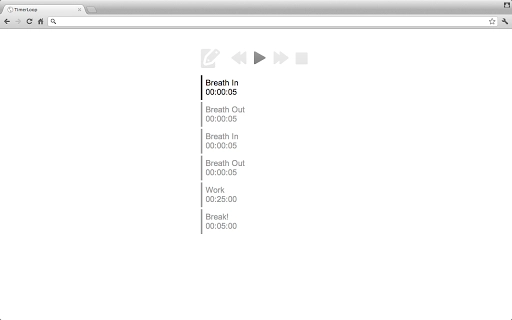
The user interface of Timer Loop is clean and minimalistic, designed for quick access to core functions. Timers are displayed in a list format with clear visual indicators for the current timer, duration, and status. Navigation is intuitive, with a linear workflow that guides users through creating, editing, and playing a timer loop.
Workflow efficiency is enhanced by features like drag-and-drop reordering and keyboard shortcuts, which allow users to manage sequences without relying on mouse input. The application responds promptly to user actions, with immediate feedback on play, pause, and reset commands. The UI layout remains consistent across supported platforms, ensuring a familiar experience for users switching between devices.
Performance observations are based on general software behavior patterns. The application is lightweight, with a file size of 2.4 MB, suggesting minimal resource usage. The developer did not specify resource usage details. Stability is supported by a long history of updates, including bug fixes for notification handling and timer accuracy. The application maintains consistent behavior across sessions, with no reported issues related to crashes or data loss.
Compatibility & System Requirements
Timer Loop is compatible with Chrome OS, Windows, and Mac operating systems. It is designed as a Chrome App, meaning it runs within the Chrome browser environment. The software has a file size of 2.4 MB, indicating a lightweight installation.
Exact system requirements were not listed. Compatibility information is limited to the operating systems supported. The developer did not provide additional system requirements. Users should ensure their system runs a current version of Chrome to support the application’s functionality.
Pros and Cons
Pros
- Simple, intuitive interface ideal for quick setup and use
- Supports offline operation for uninterrupted performance
- Flexible timer sequencing with drag-and-drop reordering
- Comprehensive keyboard shortcut support for efficient navigation
- Customizable alarm settings per timer
- Repeatable loops with completion tracking
- Lightweight at only 2.4 MB
- Available across multiple platforms including Chrome OS, Windows, and Mac
Cons
- No official support for Linux operating systems
- Dependent on Chrome browser environment, limiting standalone use
- Interface may feel outdated compared to modern desktop applications
- No built-in analytics or reporting features for tracking usage over time
- Version history suggests limited recent updates beyond initial release
FAQ Section
Is Timer Loop available for Linux?
Currently, the application is only supported on Chrome OS, Windows, and Mac. There is no official version for Linux.
Can I use Timer Loop without an internet connection?
Yes, Timer Loop works entirely offline. Once installed, it does not require an internet connection to function.
How do I update Timer Loop?
Updates are delivered automatically through the Chrome Web Store. Ensure your Chrome browser is up to date to receive the latest version.
What type of license does Timer Loop have?
Timer Loop is free to download and use. It does not require a paid license or subscription.
Can I use Timer Loop for interval training?
Yes, the application is well-suited for interval training. Users can set alternating timers for sprint and rest periods, with automatic looping to maintain rhythm.
Final Thoughts + CTA
Timer Loop delivers a focused, no-frills solution for users seeking structured time management through repeating timer sequences. Its ability to handle multiple timers in a customizable loop, combined with keyboard shortcuts and offline functionality, makes it a reliable tool for productivity, fitness, and gaming scenarios. While the interface may appear dated and the platform support is limited to Chrome-based systems, its core functionality remains effective and efficient.
For students, remote workers, fitness trainers, and game organizers, Timer Loop offers a practical way to maintain rhythm and discipline without distractions. The long-standing presence of the software, with consistent updates since 2012, speaks to its stability and user value.
Download Timer Loop now
Guides & Tutorials for Timer Loop App for Chrome
How to install Timer Loop App for Chrome
- Click the Preview / Download button above.
- Once redirected, accept the terms and click Install.
- Wait for the Timer Loop App for Chrome download to finish on your device.
How to use Timer Loop App for Chrome
This software is primarily used for its core features described above. Open the app after installation to explore its capabilities.
User Reviews for Timer Loop App for Chrome 0
No reviews found





